Turn a PDF into
a Press Sheet in Seconds
Upload a PDF, pick an imposition mode — N-up, Booklet or Step & Repeat — set the sheet size, margins and printer marks. Download the finished PDF and send it straight to print. It’s free. Actually free.
- Free, no account.
- Every feature is free from the first open — no sign-up, no e-mail, no card and no trial period.
- Runs right in your browser.
- The PDF is processed right in your browser. There is nothing to install and nothing to upload to a server.
- Vector-perfect.
- PDF pages are placed without rasterising — text, lines and artwork stay sharp.
- Any sheet size.
- 38 ready formats: A, B, SRA and RA series, press sheets, board, Letter and Tabloid. You can also set a size of your own.
- Printer marks.
- Add crop marks, registration marks, a colour bar and a page info line — everything the sheet needs for the press.
- Preview & download.
- Check the layout in the preview and download the finished PDF in one click.
Imposition modes
Three imposition modes in one tool
Pick the layout that fits the job: place several pages on one sheet, prepare a booklet with the pages in the right order, or repeat a single design as many times as you need.
N-up
- Any sheet size — a preset or your own
- Rows × columns or auto-fit
- Margins and gutters between pages
- Scaling: fit, fill or actual size
- Crop marks at the corners
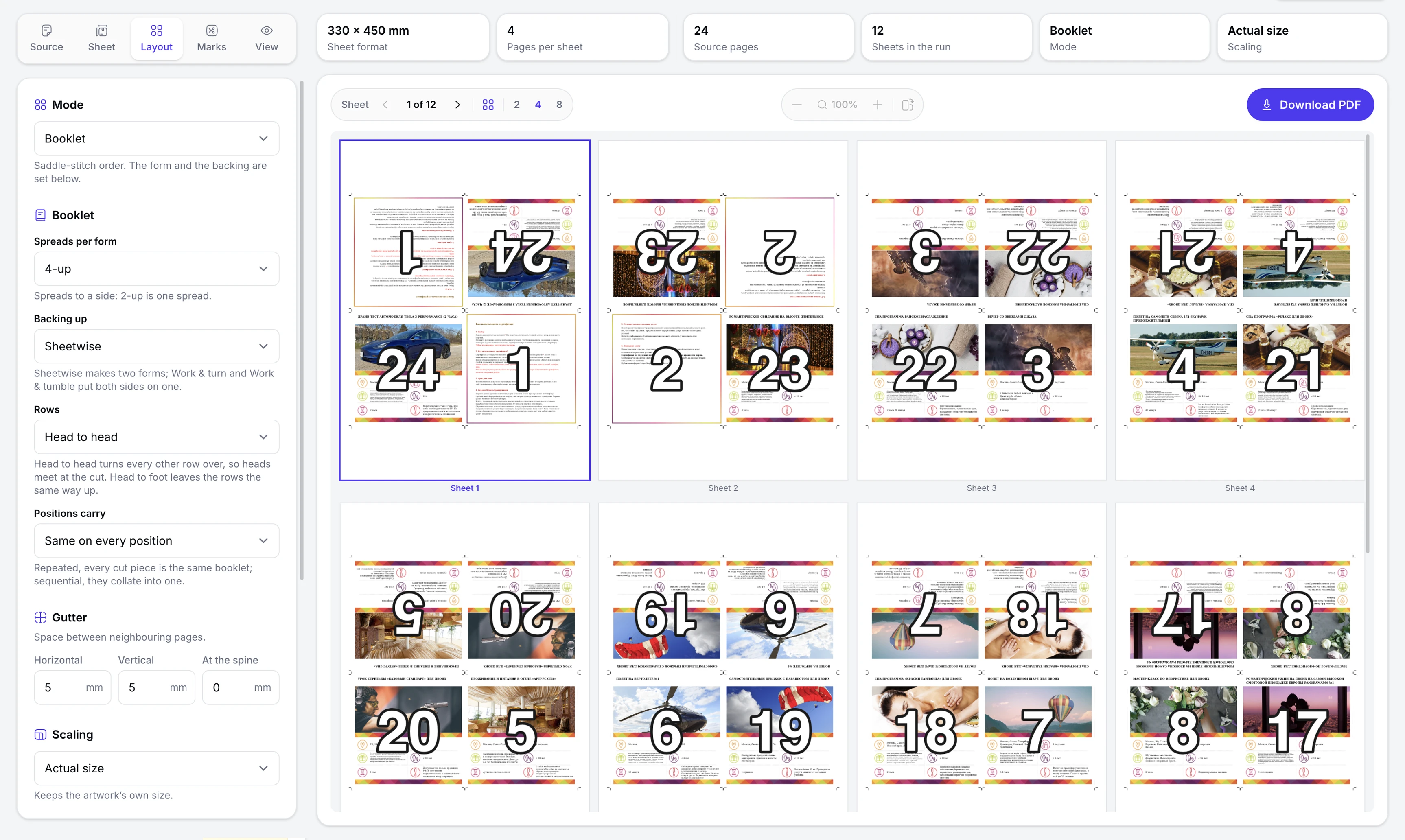
Booklet
- Page order worked out automatically
- 2, 4, 8 or 16 pages to a sheet
- Sheetwise, work-and-turn or work-and-tumble
- Head-to-head or head-to-foot — which way the top of the page faces in neighbouring rows
- Automatic blank padding to a multiple of four
Step & Repeat
- One design — as many copies as you need
- Adjustable spacing between copies
- Any grid size
- Crop marks for every copy
Everything in the tool
What the tool can do
The sheet, the layout, the source PDF and the printer marks — all of it adjustable and open from the start, with no sign-up.
Sheet and layout
Set the sheet size and how the pages sit on it.
- Ready presets: A and B series, SRA and RA, press sheets and North American formats
- Custom sheet size in millimetres or inches
- Rows × columns by hand or auto-fit
- Separate margins on each side
- Horizontal and vertical gutters between pages
Three imposition modes
One tool for different print jobs.
- N-up — several pages on one sheet: business cards, flyers, proofs
- Booklet — pages in the right order for a booklet, 2 to 16 on a double-sided sheet
- Step & Repeat — one design repeated across the whole sheet
- Page order worked out automatically
- Switching mode without resetting the sheet, margins and printer marks
Source PDF
Prepare the pages before imposing.
- Trimming the source page on each of the four sides
- Reordering, deleting and duplicating pages
- Adding blank pages to reach the multiple you need
- Vector placement without rasterising — text and artwork stay sharp
- Processed right in your browser — the PDF is not uploaded to a server
Marks and preview
Check the result before printing.
- Crop and registration marks, colour bars and a page info line
- Marks placed inside the sheet margins
- Live preview built from the source PDF
- View all sheets or a single sheet zoomed in
- A print-ready PDF in one click
How it works
From PDF to press sheet in four steps
Nothing to install, nothing to upload to a server. Drop in a PDF, set up the imposition and download the finished file.
Upload your PDF
Drag the artwork into the tool. The file stays on your device.
Set up the sheet
Choose the format, the imposition mode, the grid, margins and printer marks.
Check the preview
Watch the result in real time — the preview updates with every change.
Download the PDF
Get a print-ready file in clean vector.
Use cases
For print, packaging and anything that gets cut
Imposition helps you place artwork on the sheet efficiently and get it ready for printing and finishing.
Business cards & flyers
Put several copies on one sheet, add crop marks and cut your paper use.
Booklets & brochures
Have the pages ordered automatically for printing, folding and stitching.
Stickers & labels
Repeat one design across the sheet with the spacing you need between copies.
Proof & contact sheets
Put several pages on one sheet to check the artwork before the run.
Packaging inserts
Get inserts, instruction slips and leaflets ready to print on one sheet.
Multi-page jobs
Catalogues, brochures and manuals — the pages go onto the press sheet in the right order.
FAQ
Good to know
Is it really free?
Yes. Every mode, preset and export is free — no account, no trial period and no card.
Do my files get uploaded anywhere?
No. The PDF is processed right in your browser and never leaves your device.
Is vector quality kept?
Yes. PDF pages are placed without rasterising, so text and lines stay sharp.
Which imposition modes are supported?
N-up, Booklet and Step & Repeat. Booklet offers 2, 4, 8 or 16 pages to a sheet, with the page order worked out automatically.
Can I set my own sheet size and add marks?
Yes. Pick one of 38 ready formats or set your own size in millimetres or inches. You can add crop and registration marks, a colour bar and a page info line.
How large a PDF can it handle?
File size depends first of all on your device and on the PDF itself. Processing runs right in the browser, so very large files need more memory.
A finished PDF in seconds
Impose the file, check the layout and download something ready for the press. Free, right in your browser, with no sign-up.